

 Français (Canada)
US Tax Data
Welcome to FDX Tax API using PDF with Embedded Data
You’ve reached the landing page for https://financialdataexchange.org/us-tax/tax-pdf/. If you have entered that from a tax form PDF or another introduction to Financial Data Exchange, welcome! This page describes FDX’s support of US Tax Information Reporting Forms using embedded data on PDF files.
FDX Standards for U.S. Tax Information Reporting
Secure and convenient exchange of U.S. taxpayer data
FDX defines standards-based exchange of taxpayer data on IRS Tax Information Reporting forms to simplify, streamline and reduce errors in the annual preparation of U.S. income tax returns.
- See Overview tab for a complete introduction
Using FDX Standards for Exchange of Taxpayer Data
Eliminates need for manual data entry
FDX Tax data standards can reduce the tedium and errors associated with manual data entry in the income tax return preparation experience.
Four different mechanisms
FDX defines four different mechanisms to support taxpayer collection and exchange of their tax data. The following tabs provide in-depth information:
- API – Tax software pulls in the data directly
- Embedded PDF – You are here! Read tax data from digital PDF files without OCR
- QR Codes – Scan tax data from codes on printed or digital tax forms
- FDX Download – Manual exchange of data in standard FDX-defined JSON files
PDF with Embedded Data Use Case
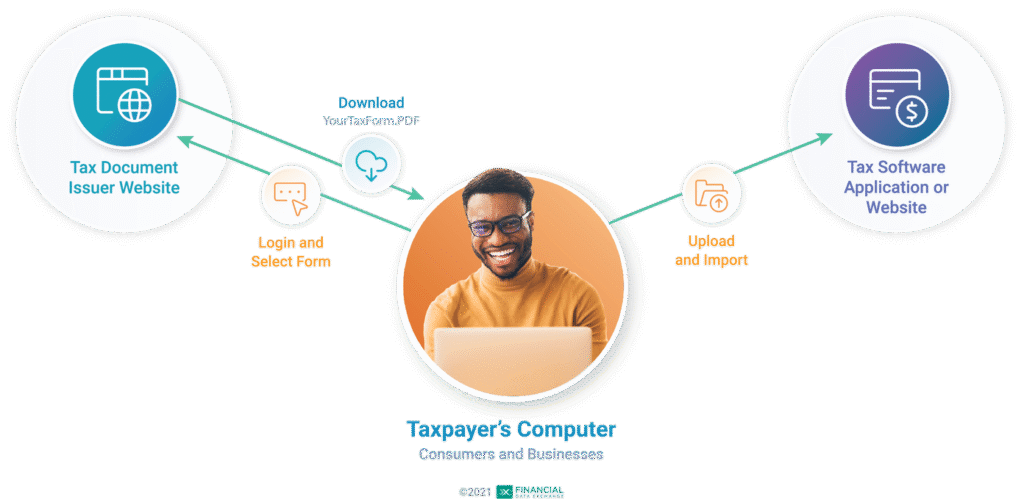
The PDF file download/upload use case is depicted in the diagram below.
It is a valid use case under the following circumstances:
- The issuer is originally delivering an income tax document as a digital PDF file.
- Or, the issuer delivers printed form(s) but also makes the corresponding income tax document(s) available online as digital PDF file downloads.
PDF files contain 3 Custom Properties for Tax Data using FDX entity and properties
Three custom properties can be added to the PDF:
- “fdxJson” contains a TaxDataList schema entity (through V5.3.3) or a TaxStatement entity (beginning V6.0.0) serialized to JSON, as shown in examples below.
- TaxDataList and TaxStatement entities provide flexibility to accommodate multiple copies of different tax forms such as may be needed by consolidated brokerage tax statements.
- “fdxVersion” is a string representation of the FDX version captured in the TaxDataList entity, such as “V4.6”, “V5.3.3” or “V6.0.0”
- “fdxSoftwareId” is the FDX Registration ID of the producer of the PDF, or another unique ID representing this producer or system, such as “ITIPS-444-333” or “Ninth-Wave-2021”
Flow diagram for PDF file download
Looking for Tax Software companies which support PDF embedded data?
For more information about tax software or tax accountants who may support embedded data in PDF files, see TaxDataExchange.
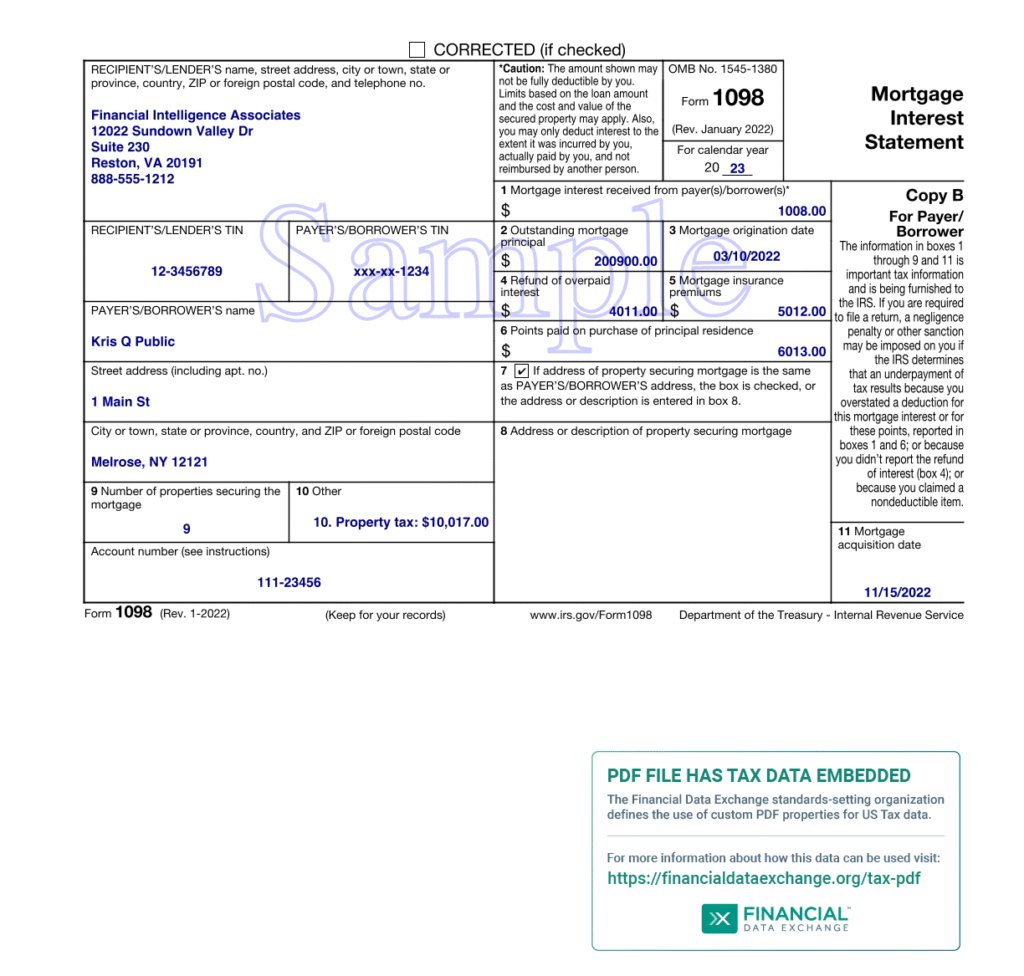
A sample tax form PDF with FDX embedded data banner:
But I’m a Tax Software company!
Companies looking to leverage tax form embedded data themselves, consider joining Financial Data Exchange as a member here.
Here are banner files you can download and display on tax information reporting forms which you deliver to taxpayers. This will inform them, or their tax return preparation partners, that the PDFs contain the embedded tax data.
Horizontal banners
6 x 3.25 inches (400 x 220 pixels)
• PNG (.png image)
• Illustrator (.ai vector graphics)
• PDF (.pdf containing the image)

For extensive technical details, example payloads and sample code, check out site Tax Data Exchange–Embedded PDF.
Examples of embedded data
FDX version V6.0.0:
| 1 | “fdxVersion”: “V6.0.0” |
| 2 | “fdxSoftwareId”: “FdxBankSoftware-2024” |
| 3 | “fdxJson”: {“taxYear”:2023,”taxStatementId”:”ID-09990111″,”issuer”:{“tin”:”12-3456789″,”partyType”:”BUSINESS”,”businessName”:{“name1″:”Financial Intelligence Associates”},”address”:{“line1″:”12022 Sundown Valley Dr”,”line2″:”Suite 230″,”city”:”Reston”,”region”:”VA”,”postalCode”:”20191″,”country”:”US”},”phone”:{“number”:”8885551212″}},”recipient”:{“tin”:”xxx-xx-1234″,”partyType”:”INDIVIDUAL”,”individualName”:{“first”:”Kris”,”middle”:”Q”,”last”:”Public”},”address”:{“line1″:”1 Main St”,”city”:”Melrose”,”region”:”NY”,”postalCode”:”12121″,”country”:”US”}},”forms”:[{“tax1098”:{“taxYear”:2023,”taxFormId”:”ID-09990111-1098″,”taxFormDate”:”2024-02-15″,”taxFormType”:”Tax1098″,”mortgagedProperties”:9,”otherInformation”:”10. Property tax: $10,017.00″,”accountNumber”:”111-23456″,”mortgageInterest”:1008.0,”outstandingPrincipal”:200900.0,”originationDate”:”2022-03-10″,”overpaidRefund”:4011.0,”mortgageInsurance”:5012.0,”pointsPaid”:6013.0,”isPropertyAddressSameAsBorrowerAddress”:true, “acquisitionDate”:”2022-11-15″,”propertyTax”:10017.0}}]} |
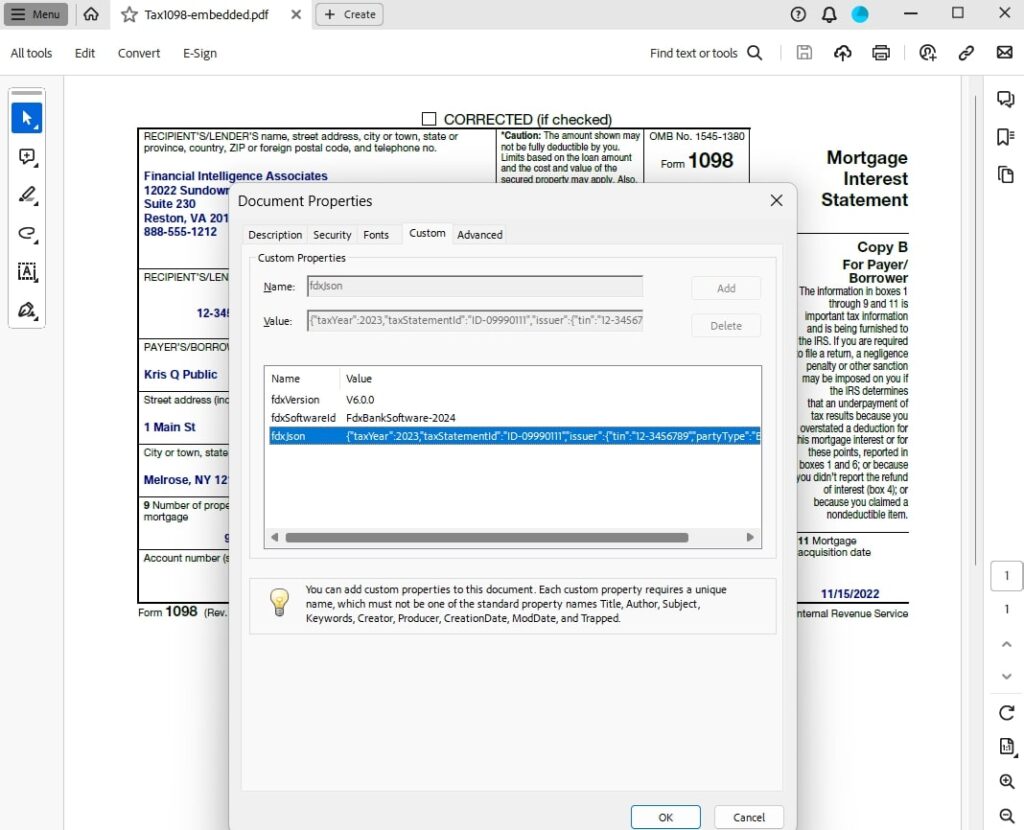
To see the data within Acrobat simply Select the menu option File → Document Properties and on the resulting pop-up Document Properties window select the Custom tab:
FDX version V5.3.3:
| 1 | “fdxVersion” = V5.3.3 |
| 2 | “fdxSoftwareId” = FDX-111-2222 |
| 3 | “fdxJson” = {“forms”: [{“tax1099Int”: {“taxYear”:2023, “taxFormDate”:”2024-01-30″, “taxFormType”:”Tax1099Int”, “payerNameAddress”: {“line1″:”12022 Sundown Valley Dr”, “line2″:”Suite 230”, “city”:”Reston”, “state”:”VA”, “postalCode”:”20191″, “country”:”US”, “name1″:”Financial Intelligence Associates”, “phone”: {“number”:”8885551212″}}, “payerTin”:”12-3456789″, “recipientTin”:”xxx-xx-1234″, “recipientNameAddress”: {“line1″:”1 Main St”, “city”:”Melrose”, “state”:”NY”, “postalCode”:”12121″, “country”:”US”, “name1″:”Kris Q Public”}, “foreignAccountTaxCompliance”:false, “accountNumber”:”111-5555555″, “payerRtn”:”007007007″, “interestIncome”:1008, “earlyWithdrawalPenalty”:2009, “usBondInterest”:3010, “federalTaxWithheld”:4011, “investmentExpenss”:5012, “foreignTaxPaid”:6013, “foreignCountry”:”Canada”, “taxExemptInterest”:8015, “specifiedPabInterest”:9016, “marketDiscount”:10017, “bondPremium”:1108, “usBondPremium”:12019, “taxExemptBondPremium”:13020, “cusipNumber”:”CUSIP”, “stateTaxWithholding”: [{“stateTaxWithheld”:17022, “state”:”NY”, “stateTaxId”:”15-000022″}]}}]} |